Works with ChatGPT and Claude

Switch AI without starting over.

An import moves your words. Uncook moves your reasoning.

Which AI are you moving to?

One tap — it decides how your handoff is written.

Paste your old chat's link

We keep neither your conversation nor your identity — only anonymous statistics. Manage cookies · See our privacy policy

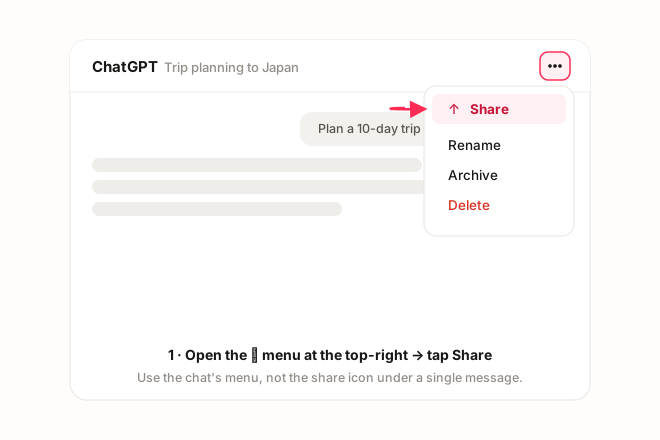
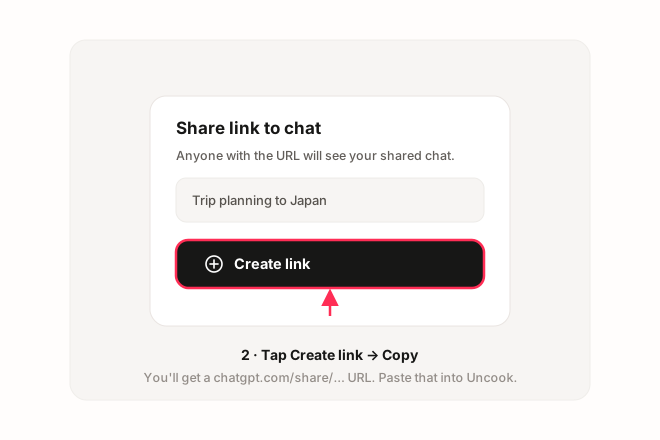
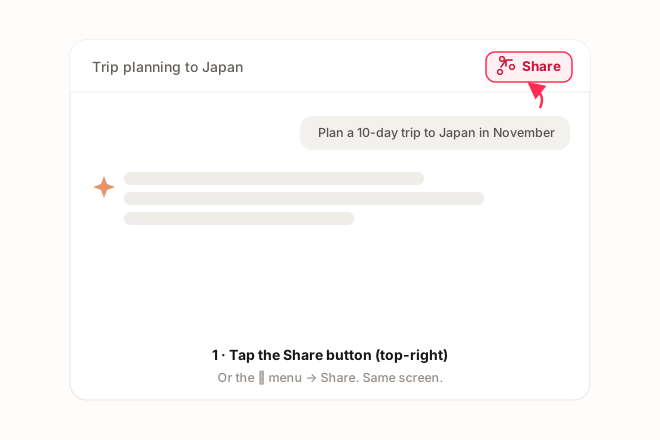
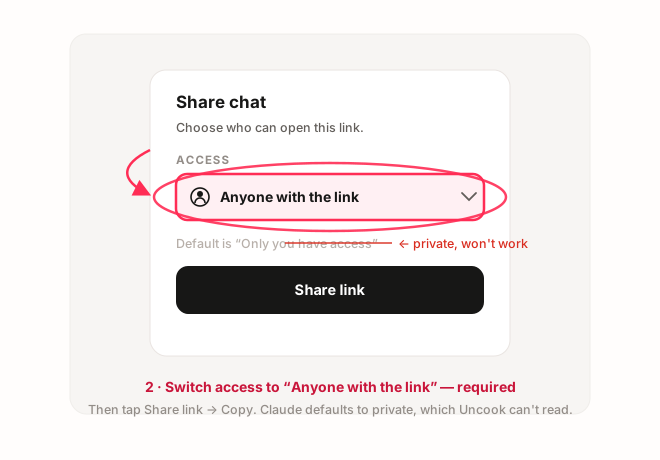
First time? How to get a share link →

It carries the why, not just the what.

A tangled conversation passes through Uncook and comes out as a clean brief for the new assistant

An export — or a summary you ask the old AI to write — hands over facts. It can't tell the new assistant which options you weighed and dropped, which choices are settled for good, and why you landed where you landed.

So the new AI does the predictable thing: it re-opens decisions you closed weeks ago, suggests the exact approach you already rejected, and asks you to justify yourself all over again.

Uncook keeps the reasoning attached to the decision. The new assistant doesn't just know what you chose — it knows what it must not undo.

No export, no account, no 24-hour wait.

The official route is a data-export zip you have to request — and wait for.

Then you're left with a folder of raw history that no other assistant knows how to read. It's an archive, not a briefing.

Uncook takes the link you already have: Share → Copy link, paste it here. About a minute later you have a handoff you can paste anywhere. No sign-up, no card, nothing to install — and the conversation is read once to write the handoff, then discarded.

Pointed at where you're going.

Claude isn't ChatGPT. ChatGPT isn't Gemini. A handoff written for nobody in particular reads like a leftover from someone else's chat.

Tell Uncook which assistant you're joining and the handoff is written as its own opening brief — addressed to the AI that will read it first, so it can take the file over on message one.

How it works

Three steps. No signup.

Copy your old chat's share link and paste it into the Uncook field

Step 1

Paste your old chat

Open it → Share → Copy link. Nothing to export, no account, no download. Not sure how?

A clean handoff document with the essential line highlighted

Step 2

Get your handoff

What you decided, why you decided it, and what's still open — not a transcript dump, not a flat summary.

The new assistant picks up the file from the handoff

Step 3

Paste it into the new AI

Message one in your new assistant. It picks up the understanding — not just the facts you'd otherwise have to re-argue.

The one-minute switch

Bring your context with you

Paste the share link of your old ChatGPT or Claude conversation. Uncook reads the whole thing and writes the handoff your new assistant needs to take over.

Get my handoff

Free, no account — and nothing is stored: your conversation is read once to write the handoff, then discarded.

Read more

Questions

Can it move my whole history over? +

No — one conversation at a time, and that's on purpose. A dump of everything you've ever said isn't context, it's noise: the new assistant would drown in it. One chat, one handoff, one clean start.

Isn't this just a summary? +

A summary is written for you to read. A handoff is written for the AI to act on: it carries the decisions with the reasons behind them, plus what's still open — so the new assistant doesn't re-open what you already settled.

Do I need an account, or an export? +

Neither. No sign-up, no card, no data-export request, no 24-hour wait. A public share link is all Uncook reads.

Which AIs does it work with? +

Today Uncook reads ChatGPT and Claude share links. The handoff it writes is plain text — you can drop it into any assistant, including the one you're switching to. Reading Gemini, Perplexity and Mistral links is coming later.

Is my conversation stored? +

No. The share link is fetched once through our server to read the conversation, and its content is sent once to our AI provider (Anthropic) to write your handoff — then discarded. Never stored, never used for training. If you generate a handoff, a copy also stays in your own browser (on your device only, never sent to us) for 24 hours, so a reload doesn't lose it — clearing it removes it immediately.